
Creating a Schedule: The Complete Guide for Tournament Organizers
With myTMAN you automatically create your game schedule – including online registration, live results and a QR code for sharing.
A good schedule is the heart of every successful tournament. Whether it's football, handball, volleyball, or another sport – without a well-thought-out schedule, chaos reigns. In this guide, we'll show you how to create a professional schedule step by step, which tournament format suits your event, and how to avoid common mistakes.
Game plan basics: What you need to know beforehand
Before you begin creating your tournament schedule, you should clarify a few basic questions. These decisions will influence the entire tournament format and schedule.
The most important questions before creating the game schedule
- How many teams are participating? The number of participants largely determines the tournament format and the number of games.
- How much time is available? An indoor tournament held in a morning requires a different format than a weekend tournament.
- How many playing fields/pitches are there? Multiple playing fields allow for parallel games and shorten the overall duration.
- What is the playing time per match? Youth tournaments often have shorter playing times (e.g. 2x8 minutes).
- Should all teams have the same number of games? In knockout systems, teams are eliminated after one defeat.
An overview of the most important tournament formats
Depending on the number of participants, available time, and desired gaming experience, different tournament formats are suitable. Here are the most common options:
Each player plays everyone else (Round Robin)
All teams play each other once. This is the fairest format, as each team plays the same number of games.
KO system (Single Elimination)
Losers are eliminated immediately. Exciting and fast-paced, but little playing time for teams eliminated early.
Group stage + knockout
Teams first play in groups, then the best qualify for the knockout round. A classic format for larger tournaments.
DFB mode
A round-robin tournament with a fixed number of games for each team. No standings. Great for very young children.
Tournament software like myTMAN often offer a wide variety of pre-made tournament modes, ranging from simple modes to complex schedules with preliminary rounds, main rounds, and final rounds.
Which format suits your tournament?
| situation | Recommended format | Reason |
| 4-6 teams, plenty of time | It's every man for himself. | Everyone has the same number of games. |
| 8 teams, one playing field | 2 groups of 4 teams each + semi-finals/finals | A good balance between games and time |
| 12-16 teams, one-day tournament | 3-4 groups + knockout phase | Each team must play at least 3 games. |
| 16+ teams, little time | Pure knockout system | Quick decision |
| Youth tournament (FE youth) | Everyone against everyone else (DFB mode), without ranking | Focus on player experience |
Creating a game plan: Step-by-step instructions
Now we're getting down to brass tacks. With these instructions, you'll create your game plan systematically and avoid typical mistakes.
Define the framework conditions
Define the date, start time, number of playing fields, playing time per game, and break times. Include fixed times (e.g., lunch break, awards ceremony).
Choose tournament format
Choose a format based on the number of participants and available time. If unsure, a group stage followed by a knockout round is usually the best choice.
Divide into groups, if necessary
Distribute the teams across the groups as evenly as possible. Tip: Put the strongest teams as group leaders and draw lots for the remaining places.
Determine the playing order
Make sure each team has sufficient rest between matches. A good rule of thumb is at least one match break between two matches played by the same team. Our myTMAN algorithm automatically calculates the optimal schedule for you, ensuring the break times are distributed as fairly as possible between the teams.
Assign playing fields
For multiple playing fields: Distribute the games evenly. Ensure a fair distribution – don't always have the same team on the "bad" field. myTMAN automatically distributes the games across the specified number of playing fields for you.
Enter times
Calculate the exact kick-off times. Allow for buffer time in case of delays. The knockout phase should only begin once all group matches are completed. With tournament software like myTMAN, you don't need to worry about this either; the times are calculated automatically.
Check and publish the game schedule
Check for overlaps and unrealistic timeframes. Share the completed game schedule with all participants – ideally digitally with live updates.
Professional tips for a smooth process
These practical tips will make your tournament even more professional:
Before the tournament
- Have a Plan B: What happens in case of last-minute cancellations? Have backup teams or alternative schedules ready. With tournament software like myTMAN, you can easily maintain a waiting list in advance.
- Use QR code: Create a QR code for the game schedule that spectators can scan. This will save you from constantly having to ask about the schedule.
- Briefing helpers: All helpers should be familiar with the schedule and know who is playing when and where. Tournament software makes this very easy, as each helper receives access to the tournament.
During the tournament
- Live results: Update results instantly – teams and spectators want to know the current standings. Ideally, share the schedule via projector on a screen or monitor. Professional tournament software like myTMAN even has integrated game timers that can track goal scorers, assists, and saves. Click here to learn more.
- Stay flexible: If a game is cancelled or delayed, the plan should be adaptable.
- Communication: Use announcements or a large screen to communicate changes.
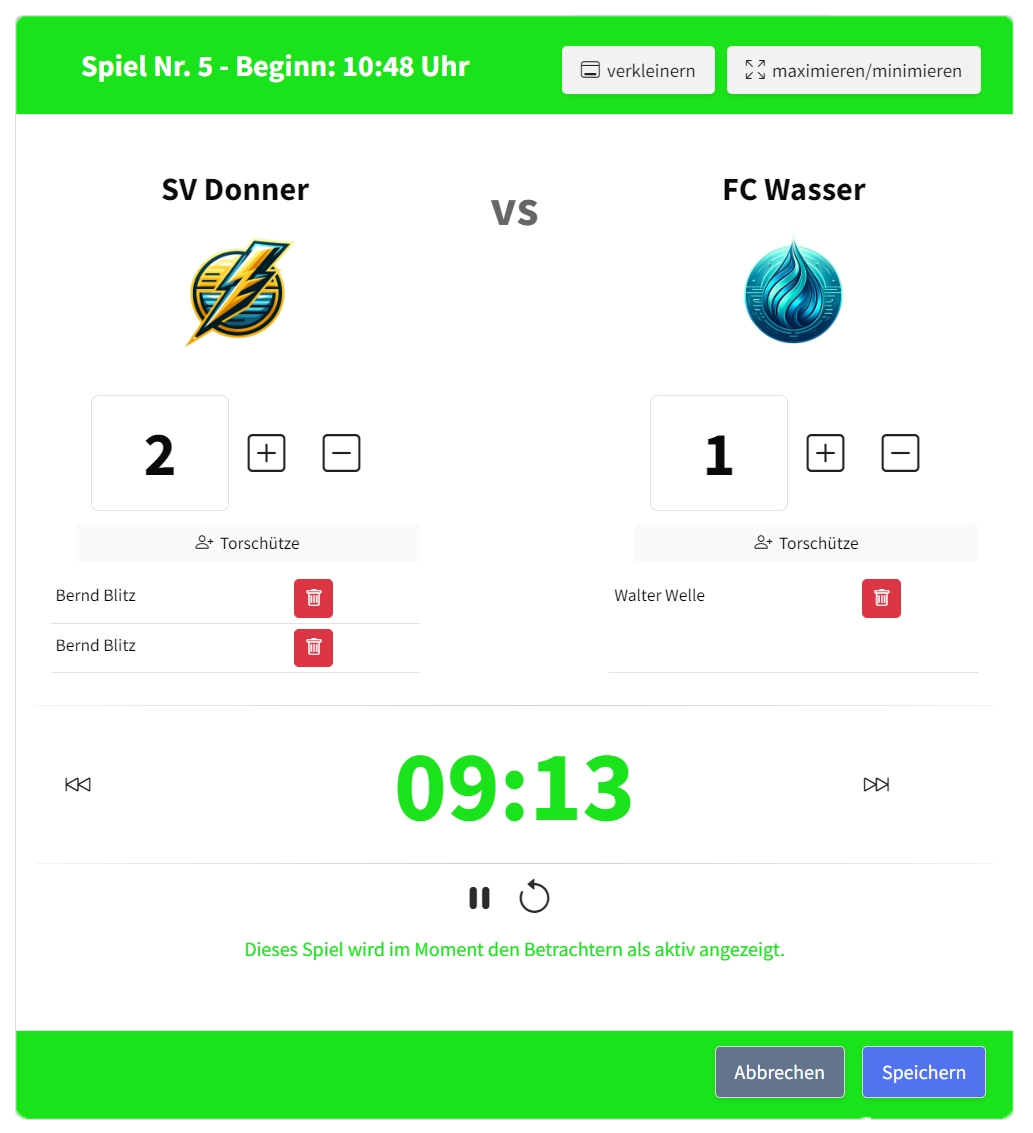
Game timer of the tournament software myTMAN
Overly optimistic scheduling is the number one mistake in tournaments. A match scheduled to start at 10:00 often doesn't actually begin until 10:05 or 10:10. With 20 matches, that adds up to a delay of 1-2 hours!
Excel vs. Software: Which is better?
Many event organizers habitually resort to Excel. But is it really worth it? Here's an honest comparison:
| criterion | Excel / Paper | Tournament software (e.g. myTMAN) |
|---|---|---|
| Setup time | 30-60 minutes (if you know how) | 5-10 minutes |
| Automatic calculation | Manual / prone to errors | Fully automatic |
| Live updates for viewers | Not possible | Via QR code / link |
| Changes during the tournament | Costly, reprint needed | Live instantly |
| Tables & Statistics | Calculate manually | Automatically updated |
| Presentation (projector/TV) | Static image | Dynamic full-screen mode |
| Cost | Free (+ time) | Often free / inexpensive |
Conclusion: If you require professionalism, use tournament software.
For a small tournament, Excel is sufficient. For club tournaments with 8+ teams, spectators, and a focus on professionalism, specialized software like myTMAN is worthwhile. You save time, avoid errors, and offer participants and spectators a modern experience.
Key points summarized
✅ Clarify the number of participants, time frame and playing fields in advance
✅ Choose the appropriate format: Round Robin for fewer teams, Groups + Knockout for larger tournaments
✅ Calculate the number of games using the formulas and plan in plenty of buffer time.
✅ Ensure sufficient rest between games of the same team
✅ Use digital tools for live updates and professional presentations
✅ Always have a plan B for cancellations or delays.
Create a game plan in under 5 minutes
With myTMAN, you automatically create your schedule – including online registration, live results, and a QR code for sharing. Get started for free!