
How do you create a professional tournament schedule?
The complete guide for sports clubs: From a blank screen to a finished tournament in 6 steps – with automatic registration management, receipts and live presentation.
Why should you use tournament planning software?
Thanks to tournament scheduling software such as myTMAN , creating and managing your tournament is easier than ever. And not only that—it lets you present your tournament to your participants in a clear and professional way!
With myTMAN you can do everything in one place:
✅ Create an online tournament schedule in minutes
✅ Automatically generate registration page & share via WhatsApp or email
✅ Centrally manage registrations and payment status
✅ Automatically create and send receipts as PDFs
✅ Present the tournament live on a projector or screen
No more time-consuming emails, complicated PDF creation, and confusing Excel lists.
Step 1: Create a new tournament
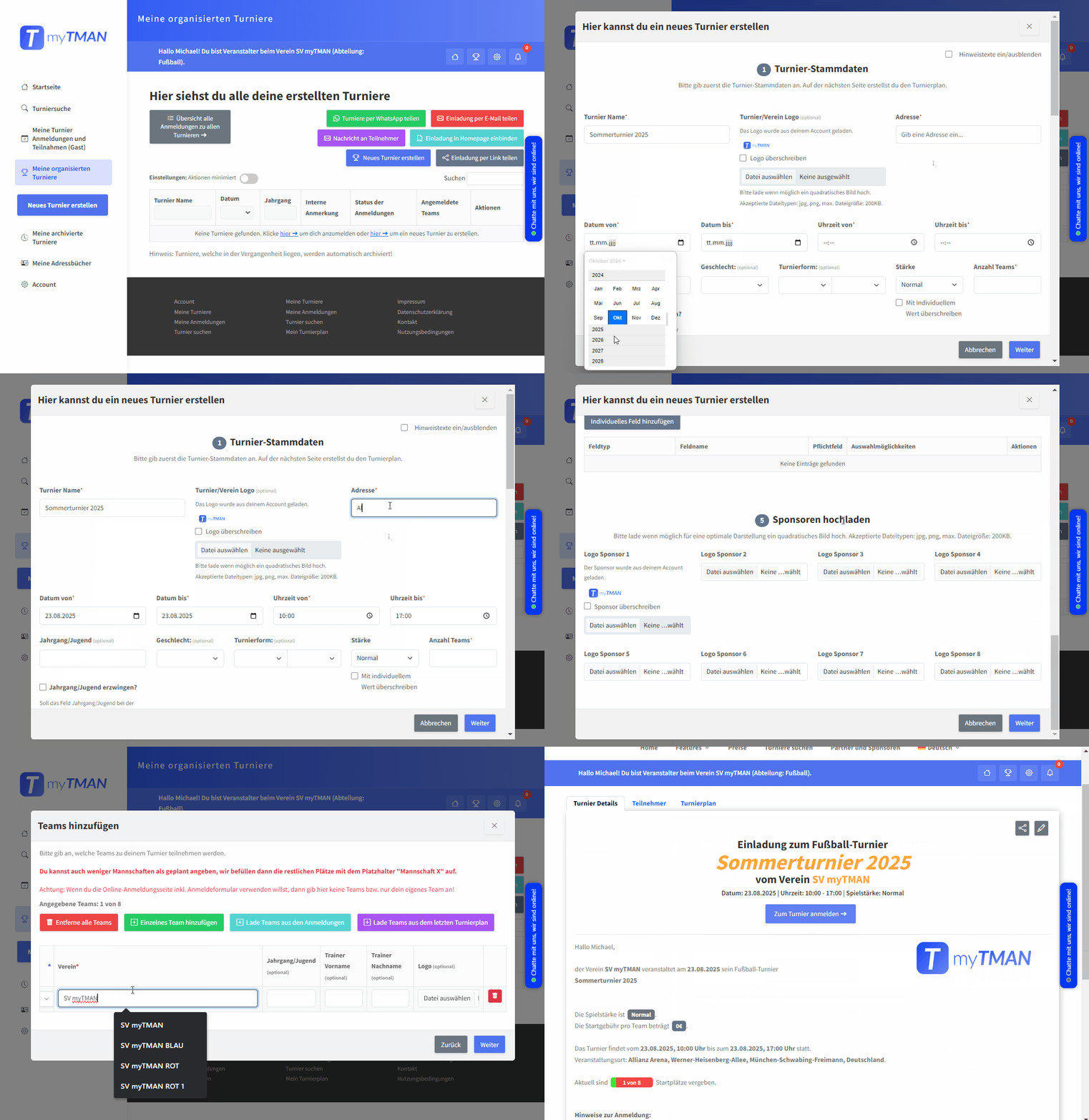
The first step is to define the basic data for your tournament. Professional software like myTMAN automatically creates an online registration page from this data.
You provide the following information:
- Name and date of the tournament
- Location / Address of the sports venue
- Tournament logo and optional sponsor logos
- Description and important notes
- Participation fee and payment method
- Additional settings (gender, skill level, individual fields)
Tip: If your own team is participating, add it right away during setup in the "Add Teams" step.
Click on the video to maximize it.
Step 2: Sending tournament invitations
Now you can send invitations to other clubs. myTMAN offers you various options – all GDPR-compliant and without violating data protection regulations.
📧
By email
Send professional invitations to your mailing list with just a few clicks.
💬
via WhatsApp
Share your tournaments with an automatically generated invitation text including links.
🔗
As a link
Create a link to share in groups or forums with one click.
🏠
On your homepage
Integrate your tournaments into your homepage with just a few clicks using HTML code.
Step 3: Accept or reject applications
As soon as a coach registers for your tournament, you will receive automatically send an email notification from myTMAN. You then decide whether to accept or decline the registration.
Here's how it works:
- Open the registrations overview
- Click "Accept Registration" or "Reject Registration"
- The coach will automatically via email informed about your decision
✅ Accept
Team participates
❌ Decline
The coach will be informed.
⏳ Waiting list
For substitutes
Step 4: Manage participation fees and send receipts
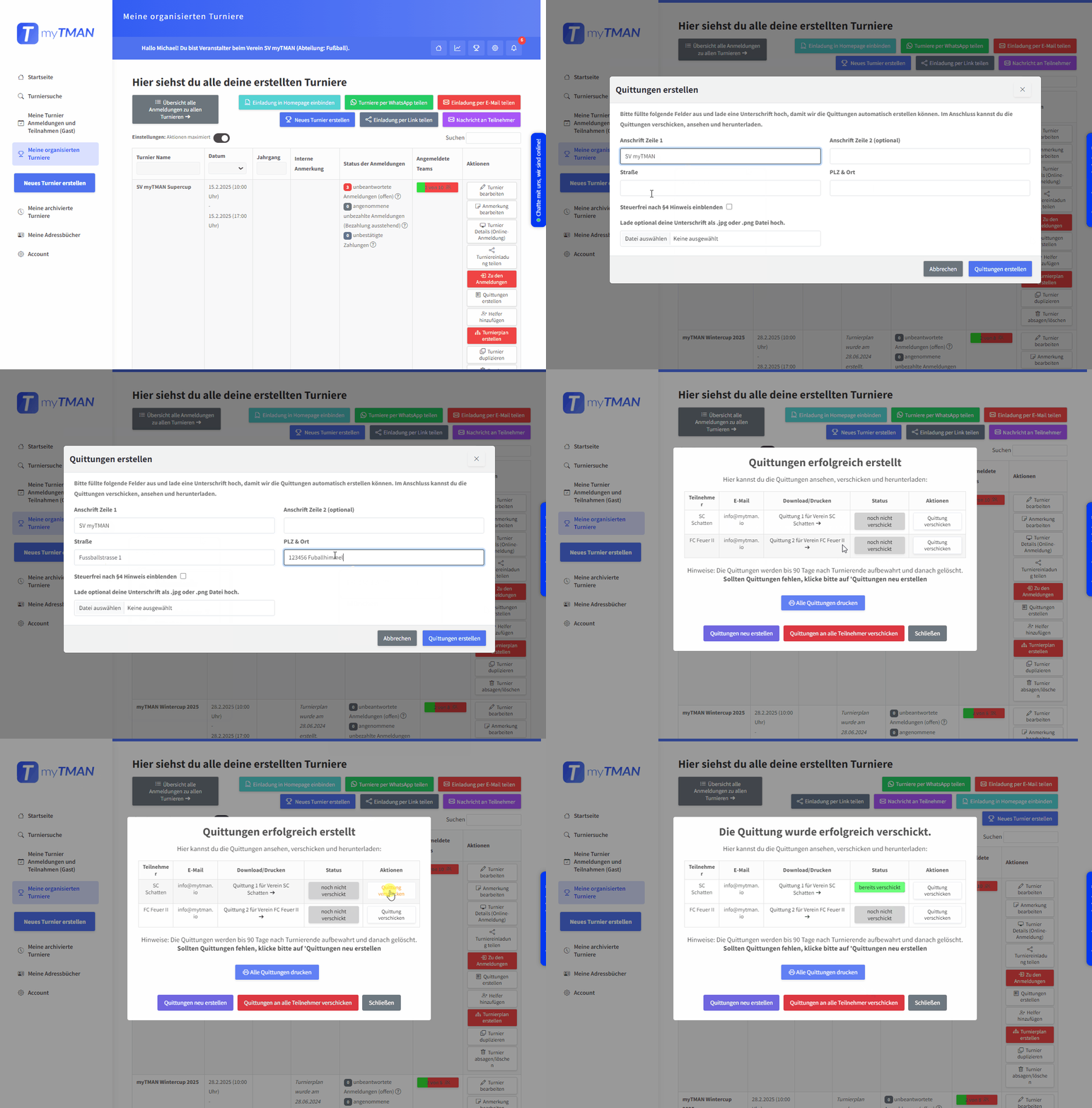
If your tournament has an entry fee, you can keep track of all incoming payments in the registration overview.
The best part: As soon as the fee is received, you can automatically create the receipt as a PDF with one click – and send it directly to the trainer via email.
Manually creating receipts is now a thing of the past!
Click on the video to maximize it.
Step 5: Print out the player registration form
If desired, your participants can register their players for the tournament online in advance. You don't need to create and send any PDFs beforehand – myTMAN takes care of that automatically.
With one click you can print the player registration forms for all participants – ready for the tournament day.
Step 6: Create, share, and run the tournament schedule
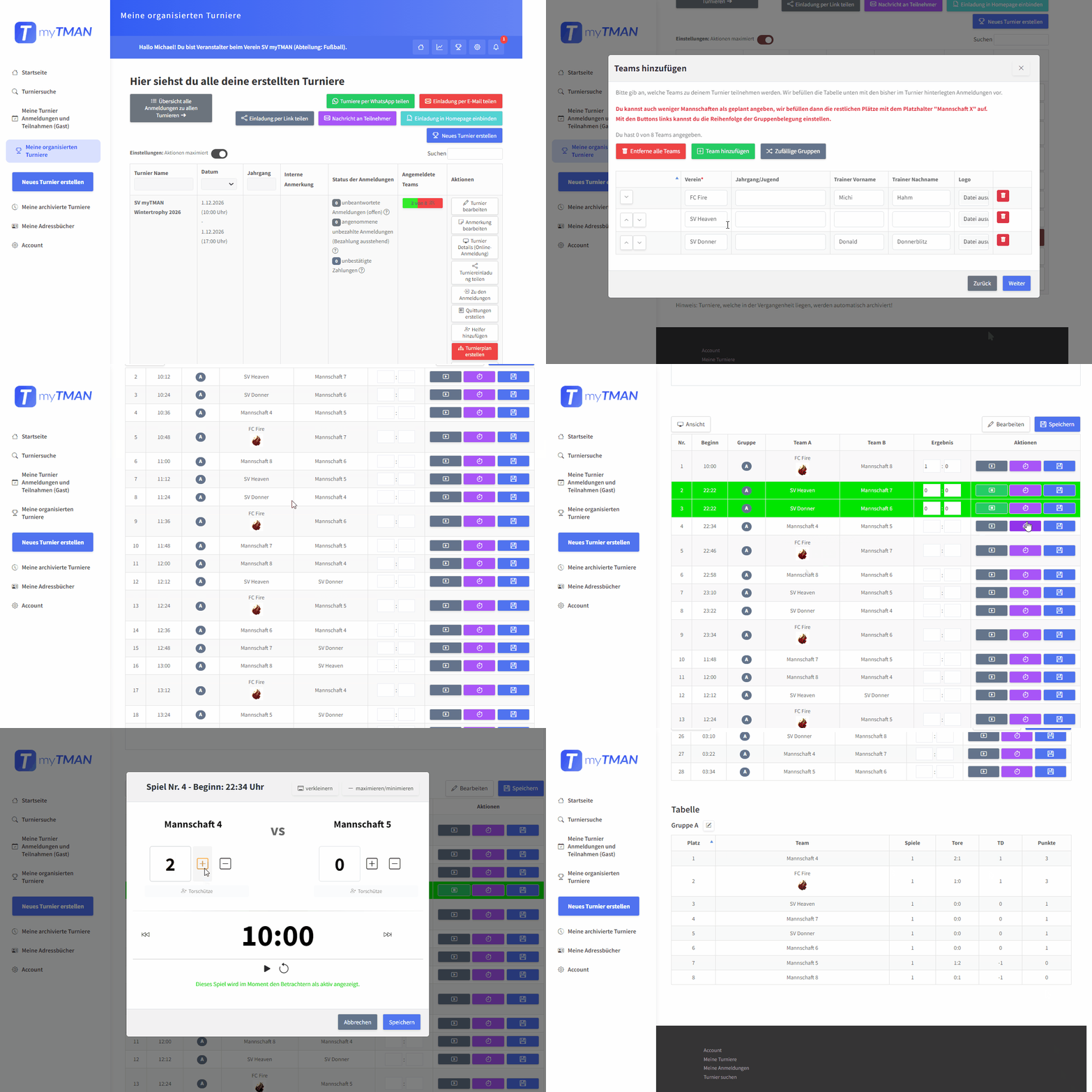
Now it gets exciting: With just a few clicks, myTMANautomatically createsyour tournament schedule. The registered teams are added automatically—no more manual entry.
On the day of the tournament:
- Tournament schedule with Print QR code – Viewers can follow live
- Conduct tournament via laptop or mobile phone
- Optional: Game timer on projector/screen transmitted
- Invite helpers via a link so they can enter results.
Over 40 tournament schedule templates available
Need a different mode? Send us an email – we'll implement it!
Tournament schedule creation with myTMAN
Click on the video to maximize it.
Ready for your first tournament?
Register for free and create your first professional tournament schedule in just a few minutes.
Further reading
Tips & Tricks for Dealing with Last-Minute Cancellations
Tips & Tricks for Dealing with Last-Minute Cancellations Your cell phone rings the day before the tournament: “Sorry, we have too many players out—we’re afraid we have to cancel.” One phone call, and the entire schedule is thrown into disarray. Or even worse: A team simply doesn’t show up, without...
Create certificates: The myTMAN certificate generator
Certificates Create Certificates for Tournaments: The New Certificate Generator from myTMAN The awards ceremony is over, the trophies have been handed out—now all that’s missing are the Certificates. And for many organizers, this marks the start of the next round of hard work: open Word, find a template, enter names...
Planning Cabin Assignments: How to Avoid Chaos on Tournament Day
Planning Locker Room Assignments: How to Avoid Chaos on Tournament Day Get Started for Free Now 16 teams, 4 locker rooms, one morning—and right in the middle of it all, the question: “Where should we change?” A well-thought-out locker room assignment is one of the most underrated...
Creating a Schedule: The Complete Guide for Tournament Organizers
Creating a Schedule: The Complete Guide for Tournament Organizers With myTMAN, you can automatically create your schedule—including online registration, live scores, and a QR code for sharing. Get started for free now. A good schedule is the heart of every...